
The Cruise Lowdown guide to using Marella Cruise Control
Images adapted from TUI/Marella
Updated August 2026
Take (Cruise) Control of Your Marella Cruise
🛑 Is Marella Cruise Control Down?
If you are experiencing a "service unavailable" or "system error" message during peak TUI booking windows, the official server is likely overwhelmed by high traffic. Before you panic, try clearing your browser cache, switching to an incognito / private window, or logging in from a different browser (like switching from Safari to Google Chrome).
🔗 Click Here to Go Directly to the Official Marella Cruise Control Login Portal
Take (Cruise) Control of Your Marella Cruise
Planning a cruise holiday involves numerous preparations, from completing check-in procedures to booking excursions. This is particularly true when booking a fly-cruise.
To streamline this process, Marella Cruises offers ‘Cruise Control’, an online hub designed to simplify pre-travel arrangements and enhance the overall customer experience.
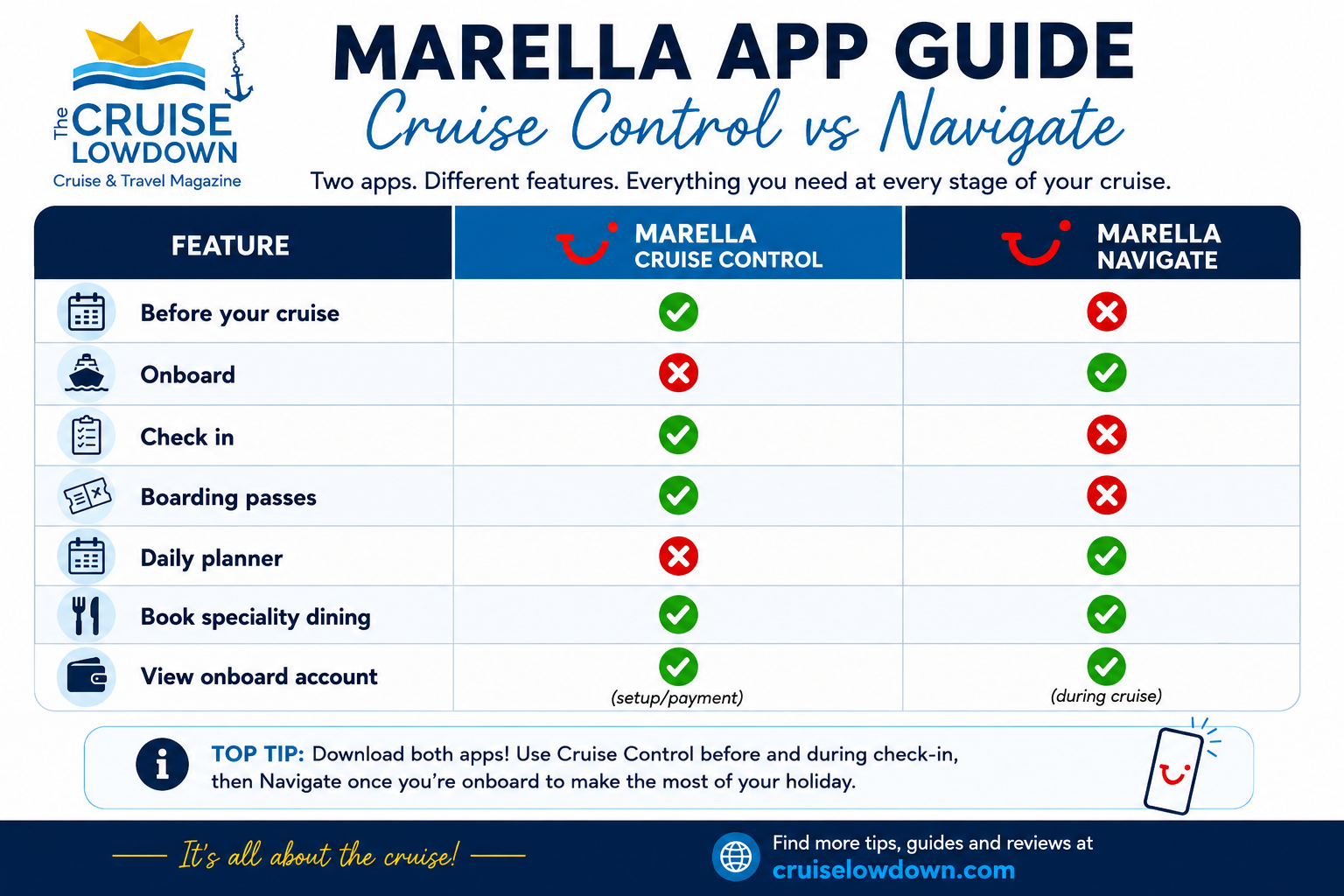
In fact, Marella Cruises offers two distinct digital platforms to enhance your cruise experience: ‘Cruise Control’ for pre-departure arrangements and the ‘Navigate’ app for onboard activities. Here is a quick comparison of the two, including when to use them:
Marella Cruise Control at a Glance
Short on time? Here’s what you need to know.
✔ Cruise Control is Marella Cruises’ online portal for managing your booking before you travel.
✔ Use it to complete your Advance Passenger Information (API), make payments, choose extras, complete online check-in, and download your boarding passes and luggage labels.
✔ Online check-in opens 14 days before your cruise.
✔ On embarkation day, connect to the ship’s Wi-Fi and use the Navigate web app for daily schedules, deck plans, onboard bookings and your onboard account.
💡 Remember:
💻 Cruise Control = Before your cruise
📱 Navigate = During your cruise
Why trust Cruise Lowdown?
This Marella Cruise Control guide is based on my own Marella Cruises experience, including completing the Cruise Control process myself. I regularly review and update this article to reflect changes to Marella’s systems and procedures. I’m also a CLIA Cruise Master (2026), demonstrating my commitment to ongoing cruise industry training and knowledge.
What is Cruise Control?
Cruise Control is Marella Cruises’ dedicated digital online platform that allows guests to manage various aspects of their upcoming voyage. Accessible via the Marella Cruises website, this user-friendly hub enables passengers to handle essential pre-departure tasks efficiently.
Your Pre-Cruise Checklist: 5 Things to Do in Cruise Control
To make sure you don't face any stressful surprises at the terminal, use this step-by-step pre-departure checklist inside the portal before you travel:
- Complete Online Check-In: Open 14 days before your sailing date to secure your arrival slot.
- Submit Your API: Securely upload your Advance Passenger Information and passport details.
- Download Boarding Passes: Print your official cruise boarding passes and luggage tags.
- Register a Payment Card: Set up your onboard account transactions seamlessly before stepping foot on the ship.
- Pre-Book Dining & Excursions: Reserve tables at specialty restaurants and book high-demand shore excursions before they sell out.
Locked Out of Your Luggage Tags? Here is the Solution
When the Marella Cruise Control system experiences a peak-traffic outage, it often fails to generate PDF documents. This leaves thousands of anxious passengers unable to print their official, colour-coded baggage labels before heading to the port terminal.
If your departure date is looming and the portal is glitching, do not panic. You can easily bypass the system issue using two straightforward workarounds:
- Collect Blank Tags at the Port: The easiest solution is to simply turn up at the cruise terminal without your tags. The baggage handlers working on the dock always carry massive stacks of blank, official Marella luggage labels. They will use a black marker to fill out your cabin details on the spot and attach them to your cases in less than thirty seconds.
- The DIY Emergency Label Method: If you prefer to have your bags fully prepared before arriving at the terminal, you can create your own secure luggage tags. Take a sturdy piece of paper or card and clearly print the following details in large block capitals: SHIP NAME, LEAD PASSENGER NAME, CABIN NUMBER, BOOKING REFERENCE, and DEPARTURE DATE. Securely tape or laminate this label to your luggage handles using heavy-duty packing tape.
As long as the shoreside baggage handlers can easily read your cabin number and ship name, your luggage will safely find its way to your cabin door on embarkation day, regardless of any digital TUI system failures.
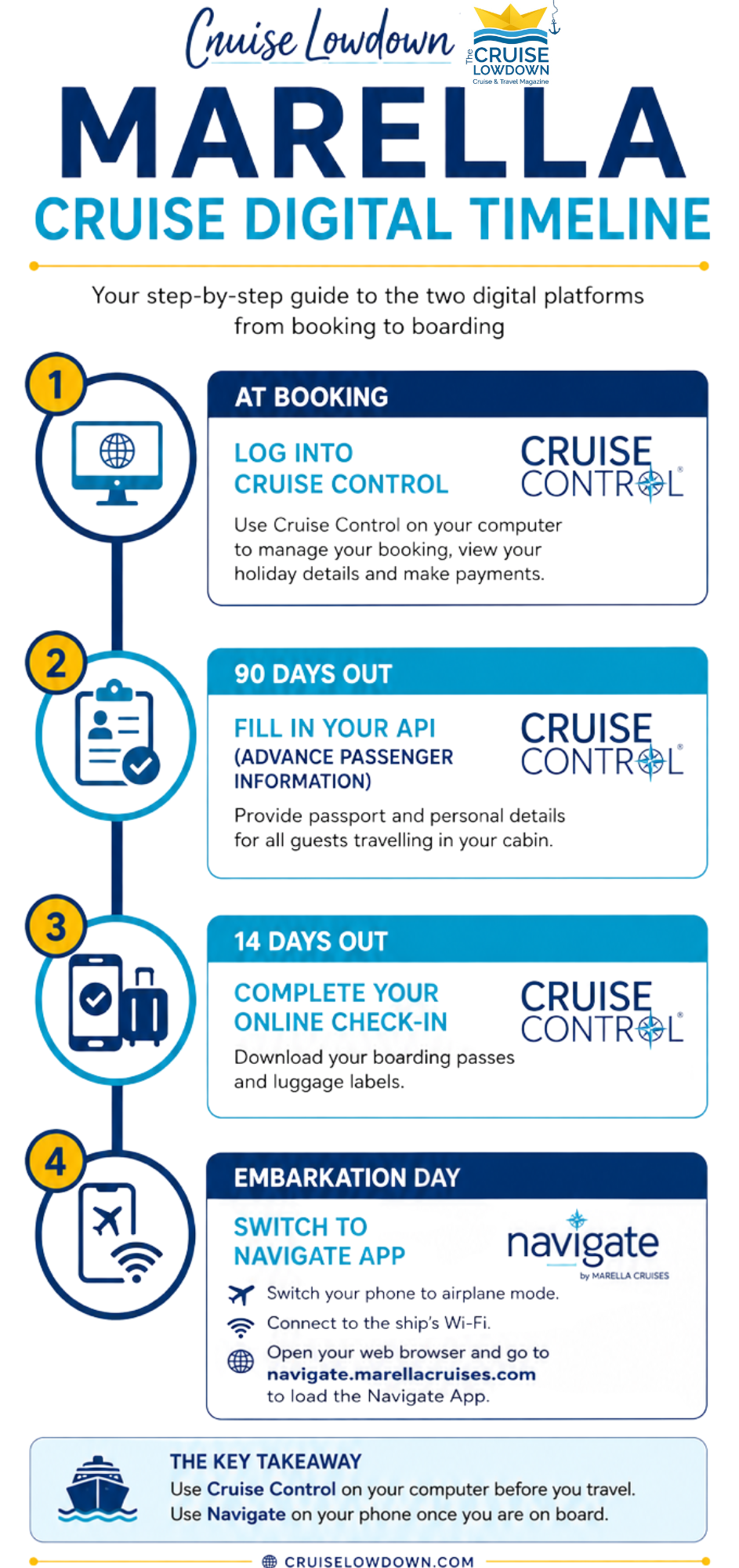
At-a-Glance: The Marella Cruises Digital Timeline
Navigating Marella’s digital steps can feel overwhelming, especially since you have to switch between two completely different platforms depending on whether you are at home or onboard the ship.
To help you stay on track, we’ve mapped out the exact timeline for your journey below. This visual checklist shows you exactly when to log into the Cruise Control website, when your mandatory check-in window opens, and the exact moment you need to switch over to the onboard Navigate app.
Getting Started with Cruise Control
To access Cruise Control, visit the Marella Cruises website. You’ll need the following information:
departure date,
booking reference,
lead passenger’s surname.
Once logged in, you can manage your booking, complete necessary pre-travel steps, and personalise your cruise experience to suit your preferences.
Marella Cruises Cruise Control Troubleshooting
Why can’t I log into Marella Cruise Control?
Login problems are often caused by:
Using an incorrect booking reference or surname.
Trying to access Cruise Control before the booking has been processed.
Using outdated browser data or cached pages.
Temporary website maintenance.
Marella Cruise Control Login Issues? Try This First
If you are struggling to log into the Marella Cruise Control platform, you are not alone. Login errors are the most common complaint among passengers. Before you panic, run through this quick troubleshooting checklist:
- Check Your Booking Reference: Ensure you are entering your official 7 or 8-digit TUI/Marella booking reference, not a flight-only reference number.
- Lead Passenger Surname Only: The system will only accept the surname of the lead passenger on the booking. If your partner booked the cruise, use their last name.
- Format the Date Correctly: Double-check that your departure date matches your confirmation email exactly.
- Clear Your Browser Cache: Sometimes the TUI login portal gets stuck on old data. Switch to an Incognito/Private window or try using a different web browser (like switching from Safari to Chrome) to bypass the glitch.
What is the Navigate App
The Navigate App is Marella Cruises’ onboard digital platform designed to help guests manage their cruise experience. Unlike traditional apps that require downloading from an app store, Navigate is a web-based app accessible through the ship’s Wi-Fi network.
Once onboard, the Navigate app serves as your digital companion, providing daily schedules, ship information, and the ability to book onboard services. Notably, the Navigate app operates through the ship’s network and does not require a separate download. You can access it via your device’s web browser once connected to the ship’s Wi-Fi.
Onboard Experience with the Navigate App
While Cruise Control is designed for pre-travel arrangements, Marella Cruises ‘Navigate’ app is designed to enhance the onboard experience.
Features of the Navigate App
Daily Schedule – View entertainment, activities, and events happening onboard.
Dining Reservations – Book tables at speciality restaurants
View Restaurant Menus
Shore Excursions – Browse and book excursions at upcoming ports.
Onboard Account Management – Check your spending and onboard account balance.
Emergency Muster Drill (MyMuster) – Complete the mandatory safety drill via video.
The Navigate app is free to use and does not require an internet package, as it operates on the ship’s network. This ensures that guests can stay informed and make reservations conveniently during their voyage.
How to Access the Navigate App
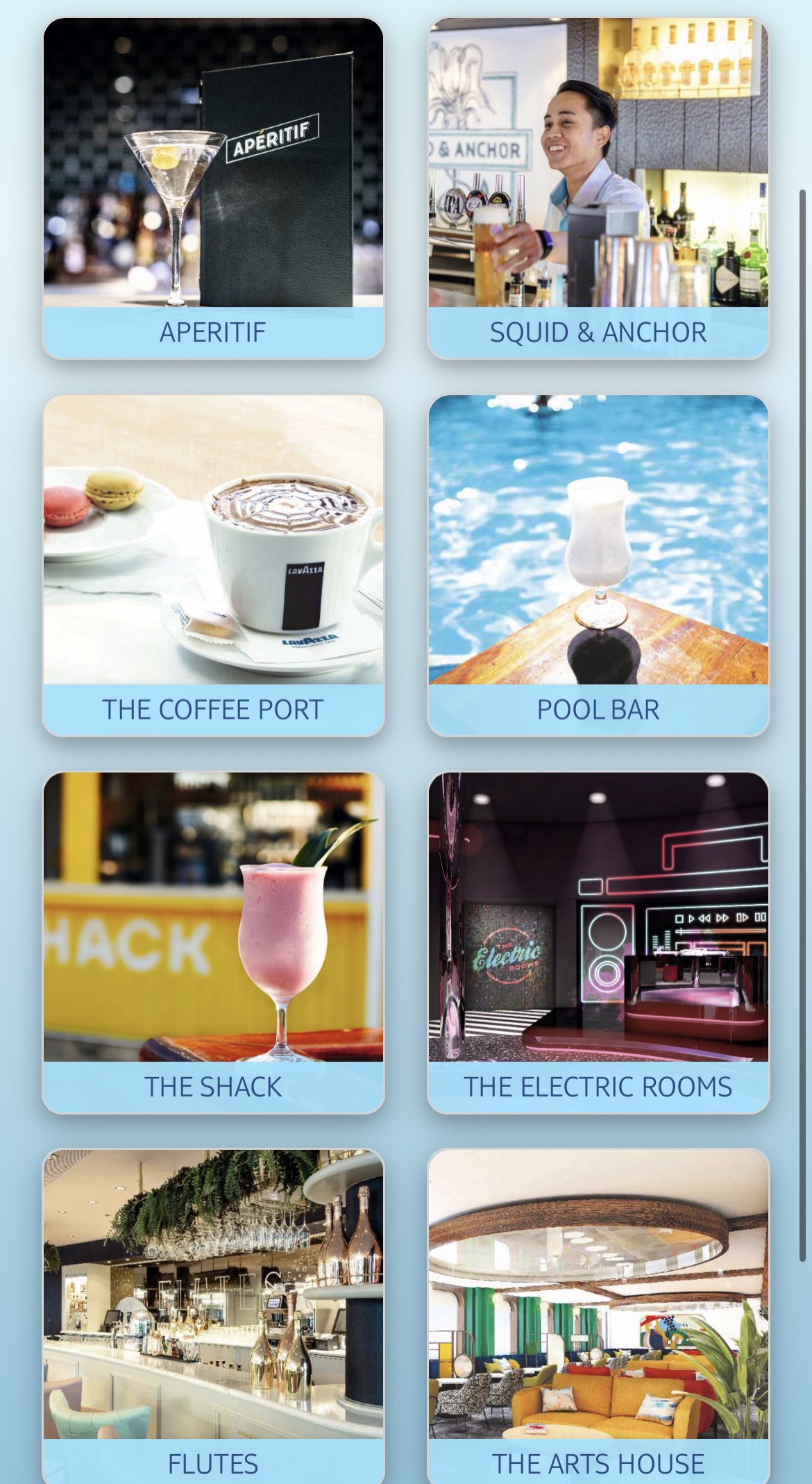
Screenshot of Navigate App onboard Marella Voyager
Once onboard, enable Wi-Fi on your device and connect to the ship’s Navigate Wi-Fi network (you should be able to do this in airplane mode).
This is a free network specifically for accessing the app and does not require an internet package.
Open Your Browser
Launch your preferred web browser (Safari, Chrome, Edge, etc.).
Enter the Navigate App URL (navigate.marella.co.uk). This will take you directly to the Navigate app’s homepage.
Log In - You may need to enter your cabin number and surname to access personalised features.
Guest Feedback
As with most technology, there is mixed feedback on Cruise Control and Navigate.
However, while specific reviews for the Cruise Control platform are limited, discussions on forums like Cruise Critic indicate that generally the Navigate app is user-friendly and enhances the onboard experience. Personally, I found it easy to use and very helpful - although it would have been nice if some some features had been available pre-embarkation.
Criticisms usually arise from user-error when logging in initially to Cruise Control (missing or mis-typed details), or the fact that Navigate can only be used onboard. If your experience is different, please let me know in comments so I can include in my feedback.
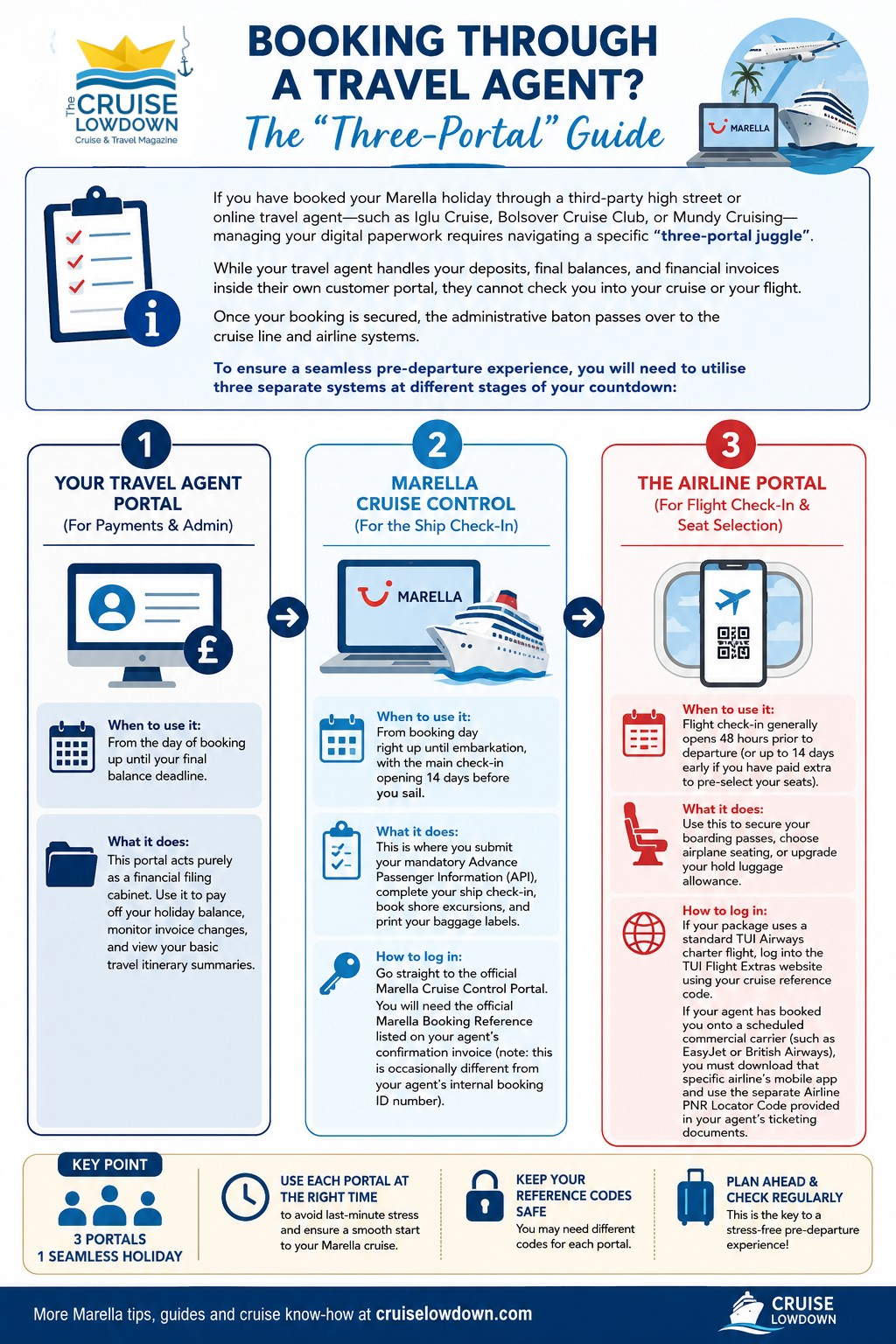
Booking Through a Travel Agent? The "Three-Portal" Guide
If you have booked your Marella holiday through a third-party high street or online travel agent - such as Iglu Cruise, Bolsover Cruise Club, or Mundy Cruising - managing your digital paperwork requires navigating a specific "three-portal juggle".
While your travel agent handles your deposits, final balances, and financial invoices inside their own customer portal, they cannot check you into your cruise or your flight. Once your booking is secured, the administrative baton passes over to the cruise line and airline systems.
To ensure a seamless pre-departure experience, you will need to utilise three separate systems at different stages of your countdown:
1. Your Travel Agent Portal (For Payments & Admin)
When to use it: From the day of booking up until your final balance deadline.
What it does: This portal acts purely as a financial filing cabinet. Use it to pay off your holiday balance, monitor invoice changes, and view your basic travel itinerary summaries.
2. Marella Cruise Control (For the Ship Check-In)
When to use it: From booking day right up until embarkation, with the main check-in opening 14 days before you sail.
What it does: This is where you submit your mandatory Advance Passenger Information (API), complete your ship check-in, book shore excursions, and print your baggage labels.
How to log in: Go straight to the official Marella Cruise Control Portal. You will need the official Marella Booking Reference listed on your agent's confirmation invoice (note: this is occasionally different from your agent's internal booking ID number).
3. The Airline Portal (For Flight Check-In & Seat Selection)
When to use it: Flight check-in generally opens 48 hours prior to departure (or up to 14 days early if you have paid extra to pre-select your seats).
What it does: Use this to secure your boarding passes, choose airplane seating, or upgrade your hold luggage allowance.
How to log in: If your package uses a standard TUI Airways charter flight, log into the TUI Flight Extras website using your cruise reference code. If your agent has booked you onto a scheduled commercial carrier (such as EasyJet or British Airways), you must download that specific airline's mobile app and use the separate Airline PNR Locator Code provided in your agent's ticketing documents.
When Do I Attach My Luggage Tags? The Charter Flight vs Scheduled Flight Rule
One of the most frequent dilemmas for fly-cruise passengers is knowing exactly when to attach their printed baggage labels - especially when flying out to Mediterranean hubs like Corfu or Palma.
The rule depends entirely on whether your travel agent has booked you onto an official Marella charter flight or a standard scheduled commercial flight.
✈️ Scenario A: You Are on a Marella Charter Flight
If you manage your flight via the TUI Flight Extras portal, you are on a dedicated charter flight. This means you receive Marella's seamless, hands-free luggage service.
The Action: Attach your colour-coded Marella luggage tags to your suitcases at home before you head to your UK departure airport.
How it works: When you drop your bags at the UK check-in desk, they are specially containerised. When you land at your destination airport, you bypass the public baggage carousels entirely and walk straight to the transfer buses. The ship's ground handling team collects your luggage directly from the tarmac and transports it straight to your cabin door.
🇪🇺 Scenario B: You Are on a Scheduled Commercial Flight (e.g., EasyJet, Ryanair, BA)
If your travel agent booked your package using a standard scheduled airline, your luggage is treated as normal commercial cargo.
The Action: Keep your Marella luggage tags safely tucked inside your hand luggage during the flight. Only attach them to your suitcases after you land and collect your bags.
How it works: When you arrive at your destination airport, you must head through passport control, wait at the public baggage carousel, and pull your own suitcases off the belt. Once you have your bags in hand, securely fasten your Marella cabin tags to the handles before walking out to the terminal arrival hall to meet your Marella transfer representative.
⚓ The Lowdown
Managing your pre-cruise admin doesn’t have to be smooth sailing's biggest hurdle. By mastering Marella’s two distinct systems, you can completely avoid embarkation terminal stress. Keep these final golden rules in mind:
Separate your systems: Use Cruise Control on your home computer for all your pre-departure paperwork, and save the Navigate App purely for when you step onboard.
Set a calendar reminder: Put a notification in your phone for exactly 14 days before you sail. That is the precise moment your check-in portal opens to download your mandatory boarding passes and baggage tags.
Keep a paper backup: Technology is fantastic until a port network drops out or a server glitches. Always print out a physical copy of your boarding passes, travel insurance policy details, and luggage labels just in case.
With your API submitted and your onboard account registered, you can step onto the ship, grab a drink, and start enjoying your holiday the moment you cross the gangway!
Marella Cruise Control FAQs
What is Marella Cruise Control?
Marella Cruise Control is Marella Cruises’ online booking portal, where you can manage your cruise before you travel. It allows you to complete Advance Passenger Information (API), make payments, add extras, complete online check-in, and download important travel documents such as boarding passes and luggage labels.
When can I check in for a Marella cruise?
Online check-in for Marella Cruises usually opens around 14 days before your departure date. Once you have completed the check-in process through Cruise Control, you can download or print your boarding passes and luggage labels ready for your journey to the port.
What is the difference between Marella Cruise Control and Navigate?
Marella Cruise Control and Navigate are used at different stages of your cruise. Cruise Control is your pre-cruise booking portal, where you manage your booking, complete check-in and access travel documents.
Navigate is Marella’s onboard web app, which you use once you are on the ship. It allows you to view daily activities, deck plans, your onboard account, and other useful cruise information.
Do I need to download the Marella Navigate app?
No. Marella Navigate is a web-based app rather than a traditional app that you download from an app store. Once onboard, connect to the ship’s Wi-Fi and open your internet browser to access Navigate.
When do I complete Advance Passenger Information (API) for my Marella cruise?
Advance Passenger Information (API) is usually available to complete around 90 days before your cruise departure. You will need to provide passport and personal details for everyone travelling on your booking through Marella Cruise Control.
Can I print my Marella luggage labels and boarding passes?
Yes. After completing online check-in through Marella Cruise Control, you can download and print your boarding passes and luggage labels before travelling to the port. It is a good idea to have these ready before your departure day to make embarkation smoother.
What can I do in Marella Cruise Control?
Marella Cruise Control allows you to manage many parts of your cruise before you travel. You can make payments, complete Advance Passenger Information (API), purchase extras such as shore excursions and drinks packages, complete online check-in, and access your cruise documents.
Can I use Marella Cruise Control on my phone?
Yes. Marella Cruise Control can be accessed on smartphones, tablets and desktop computers. While it works on mobile devices, some guests find it easier to complete check-in and download or print documents using a laptop or desktop computer.